
YOUR BUSINESS TOOLKIT

The essentials are included.
The extras are up to you.

Add a little more capability when it earns its place.
One-time add-ons. No per-employee software charges.

TEAM PLANNING

A clearer week ahead.

Bring weekly shift planning into your manager workspace. Start with drafts, publish the roster when it’s ready, and share it with the team in your usual way.

  • Create and edit shifts for active employees
  • Publish drafts and keep a clear revision history
  • Detect overlapping shifts before saving
  • Copy a week using the same local start and end times
  • Print a published roster or download its CSV

Planned shifts never clock anyone in, change worked hours, or deduct meals. Published schedules are shared by print or CSV; an employee scheduling portal and automatic payroll forecasting are not included.

$49.99one time · one installationAdd Team Planning
EXAMPLE WEEKReady for the week.Published roster

MON 16

Alex · 8:00–4:00Front desk

Jamie · 9:00–5:00Front desk

TUE 17

Jamie · 8:00–4:00Front desk

Alex · 9:00–5:00Front desk

WED 18

Alex · 8:00–4:00Front desk

Jamie · 9:00–5:00Front desk
Schedules stay separate from actual timecards.

STUDIO PRO

A clock with your point of view.

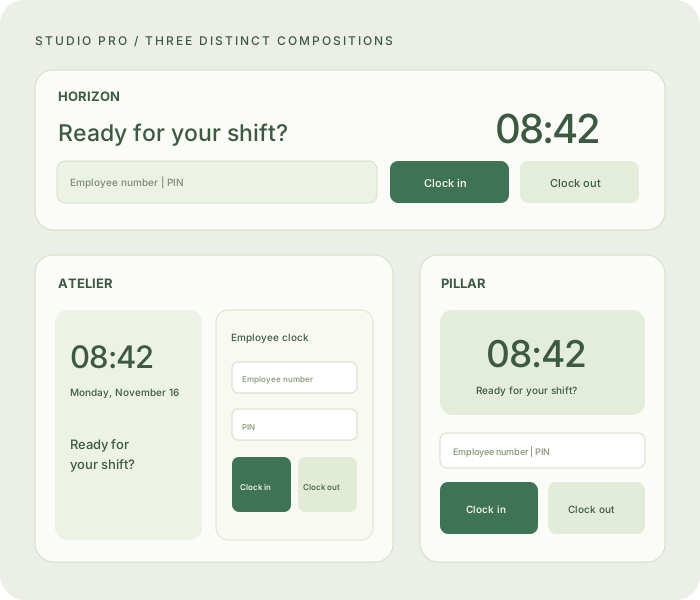
Start with three additional compositions: Horizon, Atelier, and Pillar. Save the designs that work for your business and apply them again in a few clicks.

  • Horizon: a broad horizontal clock and form
  • Atelier: two balanced panels with a calm studio feel
  • Pillar: a framed station with a prominent clock face
  • Keep up to 20 named clock-design presets
  • Restore layout, colors, labels, note, and note expiry together

Your original Canvas, Focus, and Station layouts, eight backgrounds, six accents, logo, and manager messages remain included with the Business License. Studio Pro adds choices.

$29.99one time · one installationAdd Studio Pro
Three illustrative Studio Pro compositions: Horizon, Atelier, and PillarLayout illustrations. Colors and labels are customizable.

FOR YOUR REPORTING WORKFLOW

A closer view of the hours.

Advanced payroll reports

Weekly summaries and detailed punch-history CSV exports for a closer view of your time records.

$29.99 one timeView in my account

QuickBooks CSV mapping add-on

Map employee identifiers and export a QuickBooks Time preparation CSV. A direct accounting connection is not included.

$39.99 one timeView in my account
Do I need a Business License first?

Yes. Optional tools extend an activated installation. If you are new, choose your Business License setup first, then add the tools you need from your account.

How does activation work?

After a verified payment your account shows the activation code. On a hosted workspace, eligible new add-ons activate automatically there. For a self-hosted installation, redeem an unbound code under License & downloads or generate its signed key from your account for offline use. Each code activates one installation.

Will this add a monthly bill for my employees?

No. These software add-ons are one-time purchases for one installation. Optional hosting is billed separately by the year and renewed manually.

Can I keep using my included clock designs?

Yes. Studio Pro does not remove your included clock layouts, colors, logo, manager message or sign-in settings.

Not sure which tool fits? Ask us before buying. Prices in USD; review the final checkout total.